
Software as a service is a cloud-based software delivery model in which users access applications over the internet rather than installing and running them directly on their own computers or servers. In a SaaS model, the software provider manages the application, infrastructure, updates, security patches, and ongoing maintenance. The customer simply logs in and uses the product. That is the main appeal. No complicated setup. No disks. No local servers. No manual updates every few months. You open the app, sign in, and start working. In simple terms, SaaS means software you use online, usually on a subscription basis. Common SaaS examples include: Google Workspace These tools are not just installed once and left alone. They are constantly maintained by the company behind them. New features are added. Bugs are fixed. Security updates are applied. The user does not usually need to manage any of that. That is what makes SaaS attractive. It turns software from something you own and maintain into something you access as a service. This means the application and its data are stored and run on remote servers instead of only on a user’s local device. These servers may be owned by the SaaS company or rented from cloud infrastructure providers. Either way, the key point is that the software is not tied to one physical computer in your office. This allows users to access the same account from different devices. A business owner might check a dashboard from a laptop in the morning, approve an invoice from a phone in the afternoon, and review reports from a home computer at night. The data is not locked to one device. It is connected to the account. This is one reason SaaS became especially valuable for remote work, hybrid teams, and companies with multiple locations. Most SaaS products are accessed through a web browser or an app that connects to the internet. This makes adoption easier because users do not usually need a complicated installation process. For example, if a company signs up for a project management tool, employees may only need an invite link. They create a password, log in, and begin using the workspace. The company does not need to ship software disks, install programs on every computer, or manually configure each machine. This online access is one of SaaS’s greatest strengths. It is also one of its weaknesses. If the internet connection goes down, access may be limited or unavailable. Some SaaS products offer offline modes, but many require a reliable connection to function properly. For most modern businesses, this is manageable. But for certain industries, locations, or workflows, internet dependence is an important consideration. One of the biggest benefits of SaaS is that the provider handles much of the technical upkeep. That usually includes software updates, bug fixes, security patches, server maintenance, data backups, performance improvements, and feature releases. This is very different from traditional software, where companies may need to install updates themselves or hire IT staff to maintain systems. Automatic updates are especially valuable because they keep users on the latest version of the product. Everyone receives improvements without needing to manually download and install new releases. However, this also means users have less control over when certain changes happen. A SaaS provider may redesign an interface, remove a feature, change pricing, or update functionality in ways that affect customers. With SaaS, convenience and control are always in tension. Traditional software often requires a large initial purchase, hardware, installation, training, and IT support. SaaS usually starts with a subscription. This makes it easier for startups, small businesses, and growing teams to access tools they might not otherwise be able to afford. A company does not need to build an entire server environment to use a modern CRM or accounting platform. It can subscribe, onboard users, and begin working. This does not mean SaaS is always cheaper over the long term. It may not be. But it often reduces the barrier to entry. That matters. It allows businesses to test tools, move faster, and avoid large technology commitments before they are ready. SaaS works well for people who need access from multiple locations. A salesperson can update a deal from the road. A bookkeeper can review invoices from home. A manager can check project progress from a phone. A remote employee can collaborate with the rest of the team without being in the office. This flexibility is one of the main reasons SaaS fits modern work. Work is no longer limited to one desk, one computer, or one office. SaaS allows software to follow the user instead of trapping the user in one place. Of course, this flexibility should be paired with strong security. Companies should use good passwords, multi-factor authentication, role-based permissions, and clear access policies. Convenience is valuable. But convenience without security can become a liability. With SaaS, users generally do not need to install new versions manually. The provider improves the software behind the scenes. New features, security patches, and bug fixes are released directly into the platform. This helps keep the product current. It also means customers benefit from ongoing innovation. A SaaS product can improve month after month without requiring the customer to buy a new version. But automatic updates can also frustrate users when changes arrive unexpectedly. A familiar button may move. A workflow may change. A feature may be redesigned. Even so, for most users, automatic updates are a net positive. They reduce maintenance work and keep the software from becoming outdated. If a company hires five new employees, it can usually add five new seats to its SaaS plan. If it needs more storage, features, or usage capacity, it can often upgrade to a higher tier. This makes SaaS useful for growing companies because the software can expand with the business. A small company might start with a basic plan. Later, it may add automation, reporting, integrations, advanced permissions, or enterprise support. The company does not necessarily need to replace the entire system as it grows. That scalability can save time and reduce disruption. However, businesses should pay attention to pricing as they scale. SaaS costs can increase quickly as more users, features, or usage limits are added. The provider handles hosting, uptime, patches, infrastructure, and many technical issues. This can be especially helpful for small businesses without a dedicated IT department. Instead of maintaining servers or troubleshooting installation issues, the company can focus on using the tool. That does not mean IT becomes irrelevant. Businesses still need to manage users, permissions, integrations, data policies, vendor risk, and security practices. But SaaS changes IT's role. It often shifts attention from maintaining infrastructure to managing systems, access, and strategy. The subscription model is convenient, but it can become expensive over time. A tool that starts at $29 per month may seem affordable. But as the team grows, the company may need more seats, higher-tier features, extra storage, or premium support. Eventually, the total cost may be much higher than expected. SaaS subscriptions can also pile up. One tool for email marketing. Another for payroll. Another for project management. Another for file storage. Another for customer support. Another for reporting. Individually, each tool may seem reasonable. Together, they can become a major expense. Businesses should review SaaS subscriptions regularly. They should ask which tools are essential, which are underused, and which overlap with other products. Because SaaS is usually internet-based, access depends on connectivity. For many users, this is not a major issue. Reliable internet is common in many workplaces and homes. But for users in areas with poor connectivity, frequent travel, field work, or high-security environments, internet dependence can be a serious limitation. If the SaaS product goes down or the user loses connection, work may stop. This is why businesses should consider uptime history, offline capabilities, backup workflows, and service-level agreements when evaluating important SaaS tools. The more critical the software is, the more important reliability becomes. With SaaS, sensitive data is often stored on the provider’s systems. That can be efficient, but it also raises security and privacy questions. Businesses should understand what data is being stored, where it is stored, how it is protected, and who can access it. They should also review the provider’s security practices, compliance standards, encryption policies, breach history, and data retention rules. This matters for any company, but it is especially important for businesses handling financial records, health information, legal documents, customer data, employee information, or confidential business material. A reputable SaaS provider may have stronger security than a small business could build internally. But customers still have responsibility. Weak passwords, poor permissions, careless sharing, and lack of employee training can create vulnerabilities even when the SaaS platform itself is secure. SaaS products are usually built to serve many customers. That makes them scalable and efficient, but it can limit customization. An on-premise software system may be deeply customized for one company’s exact process. A SaaS product may offer settings, integrations, templates, and workflows, but it may not allow full control over every detail. For many businesses, that is fine. In fact, a standardized SaaS workflow can be helpful. It can push a company toward cleaner processes. But for companies with unusual requirements, strict compliance needs, or highly specialized operations, limited customization can be frustrating. The key question is whether the SaaS product fits the business well enough without forcing harmful compromises. Vendor lock-in happens when a company becomes so dependent on a software provider that switching becomes difficult. This can happen for several reasons. The company may have years of data in the platform. Employees may be trained on it. Workflows may depend on it. Integrations may connect it to other systems. Migrating away may require time, money, and technical support. That does not mean businesses should avoid SaaS. But they should think ahead. Before committing to a major SaaS platform, it is wise to ask: Can we export our data? A good SaaS decision considers not only how easy it is to start, but also how hard it would be to leave. Start with the problem, not the software. Many people choose SaaS tools because they look impressive. They watch a demo, see a beautiful dashboard, and imagine how organized everything will become. But software does not fix unclear processes by itself. Before choosing a SaaS product, define the actual problem. Are you trying to save time? Reduce errors? Track leads? Improve communication? Automate billing? Manage projects? Support customers? Replace spreadsheets? The clearer the problem, the easier it is to choose the right tool. Once the problem is clear, compare features and pricing. Do not only look at the starting price. Look at the plan you will actually need. Some SaaS products advertise a low entry price but reserve important features for higher tiers. Pay attention to potential user, storage, and automation limits. You should also look at reporting features, integrations, support levels, contract length, implementation fees, and price increases after a trial period. A cheap tool can become expensive if it lacks the features you need. An expensive tool can be worthwhile if it replaces several other systems or saves significant time. Security should be part of the buying decision, especially for business-critical software. Review how the provider protects data. Look for features such as multi-factor authentication, encryption, permission controls, audit logs, backups, and admin settings. If your business operates in a regulated industry, compliance matters even more. You may need to consider standards related to financial data, health data, privacy laws, or industry-specific requirements. Do not assume every SaaS product is secure enough for every use case. A tool that is fine for simple task tracking may not be appropriate for sensitive customer records or confidential legal documents. Most businesses use multiple software products. The right SaaS tool should fit into the existing workflow. Integrations can save time by allowing systems to share data. For example, a CRM might connect to an email marketing platform. An accounting tool might connect to a payment processor. A project management tool might connect to Slack. Without integrations, employees may need to copy information manually from one system to another. That creates extra work and increases the chance of mistakes. Before choosing SaaS, ask how it connects with the tools you already use. Customer support matters most when something goes wrong. A SaaS product may look great during a demo, but the real test comes when users need help, data is not syncing, billing has an issue, or the platform goes down. Review support options before committing. Does the provider offer live chat, email support, phone support, documentation, onboarding, or a dedicated account manager? Are support options limited by plan? Reliability also matters. For mission-critical tools, look for uptime history, status pages, service-level agreements, and backup procedures. A tool that is central to your business should be dependable. SaaS often makes sense when a business wants to move quickly, reduce IT complexity, support remote access, scale users easily, and avoid large upfront software costs. It is especially useful for common business needs such as email, accounting, payroll, CRM, project management, marketing, communication, and file storage. SaaS is also a good fit when the provider can maintain the software better than the customer could internally. For many small and midsize businesses, this is the case. They do not want to manage servers or custom software. They want reliable tools that help them run the business. Traditional software may be better when a company needs deep customization, full local control, offline access, specialized performance, or strict data ownership requirements. Some organizations may prefer on-premise software because of regulatory, security, or operational needs. Others may use traditional software because it integrates with legacy systems that are difficult to replace. There are also cases where a one-time license may be more cost-effective over the long term, especially if the software does not need frequent updates or collaboration features. SaaS is convenient, but convenience is not the only factor. Control, cost, customization, and compliance matter too. Software as a service has become one of the most important software delivery models in the modern economy. It makes software easier to access, update, and scale. It allows individuals and businesses to use powerful tools without managing complex infrastructure. It supports remote work, collaboration, automation, and faster adoption. But SaaS is not automatically the best choice in every situation. Subscription costs can add up. Internet dependence can create limitations. Security and privacy need to be reviewed carefully. Vendor lock-in can make switching difficult. The best approach is simple: understand the problem you need to solve, carefully compare your options, and choose software that fits your actual workflow.What Is Software as a Service?
Microsoft 365
Salesforce
Slack
Zoom
Dropbox
Shopify
HubSpot
Canva
QuickBooks OnlineHow Does SaaS Work?
SaaS Is Hosted in the Cloud
Users Access SaaS Through the Internet
The Provider Handles Updates, Security, and Maintenance
Benefits of SaaS
Lower Upfront Costs
Easier Access From Anywhere
Automatic Updates
Scalability for Growing Businesses
Reduced IT Maintenance
Drawbacks of SaaS
Ongoing Subscription Costs
Dependence on Internet Access
Data Security and Privacy Considerations
Limited Customization
Vendor Lock-In
What happens if prices increase?
How hard would it be to switch?
Are there long-term contracts?
Does the provider integrate well with other tools?
Would leaving this platform disrupt our operations?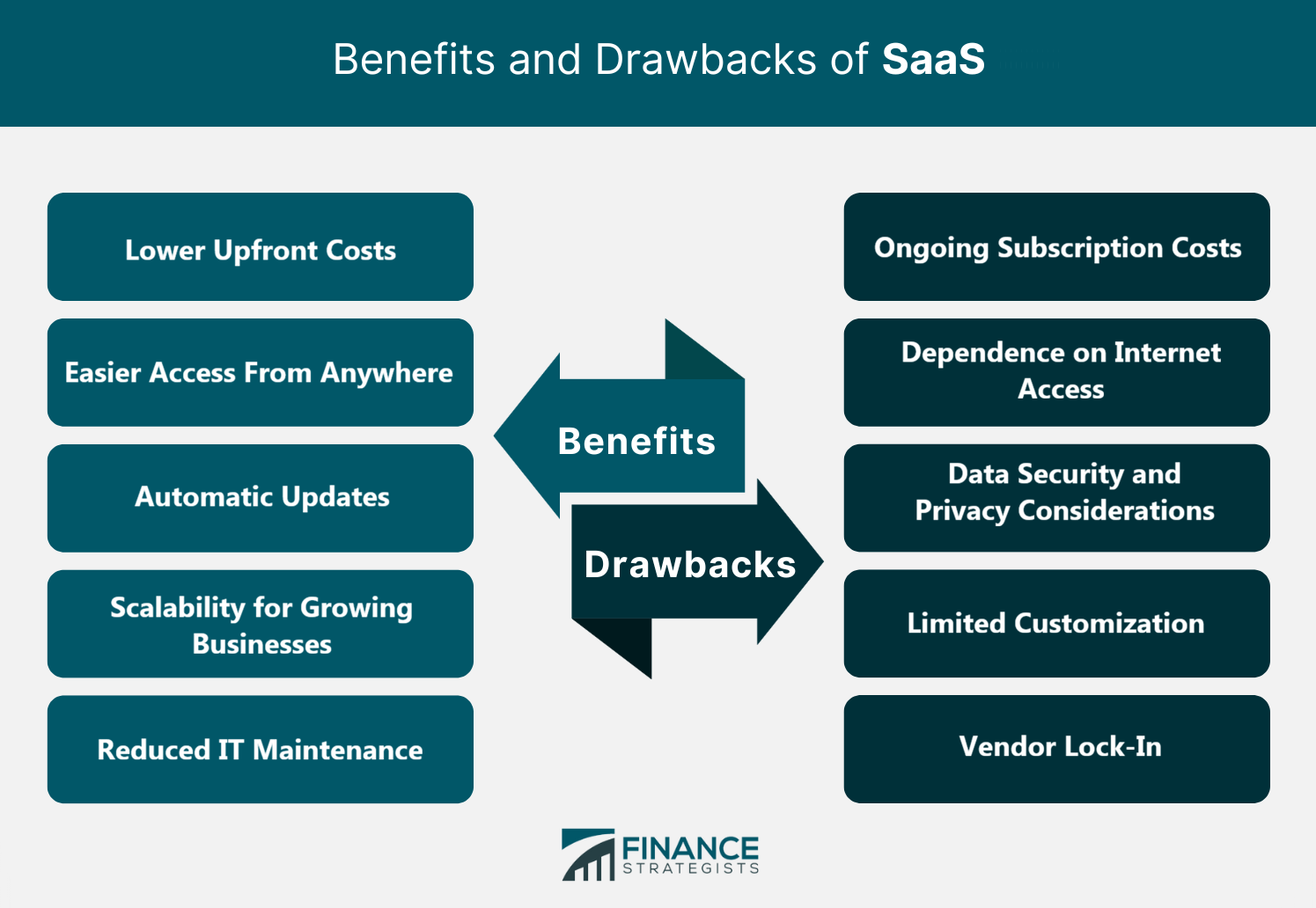
How to Choose the Right SaaS Product
Identify the Problem You Need to Solve
Compare Features and Pricing
Review Security and Compliance Standards
Consider Integrations With Existing Tools
Evaluate Customer Support and Reliability
Is SaaS Right for Your Business?
When SaaS Makes Sense
When Traditional Software May Be Better
Bottom Line
Software as a Service (SaaS) FAQs
SaaS stands for software as a service. It refers to software that is hosted by a provider and accessed by users over the internet, usually through a subscription model.
SaaS is a type of cloud computing. Cloud computing is the broader category. It includes many ways to deliver computing resources over the internet, such as software, platforms, infrastructure, storage, and databases. SaaS specifically refers to complete software applications delivered through the cloud.
SaaS can be safe to use, but safety depends on the provider, the product, and the user’s security practices. A strong SaaS provider may offer encryption, secure infrastructure, backups, compliance features, permission controls, and ongoing monitoring. But users still need to manage passwords, access, devices, employee permissions, and data-sharing habits. Security is shared. The provider has responsibilities, and so does the customer.
Most SaaS products require internet access. Some offer limited offline functionality, but the full experience usually depends on being connected. For example, a document app may let users edit offline and sync changes later. But many SaaS tools require an active connection to provide real-time updates, database access, collaboration, or reporting. If offline access is important, check that feature before choosing a SaaS product.
Some of the best-known SaaS companies and products include Salesforce, Microsoft 365, Google Workspace, Adobe Creative Cloud, Zoom, Slack, Shopify, Dropbox, HubSpot, Intuit QuickBooks, Workday, and ServiceNow. These companies serve different needs, but they all use the basic SaaS model: customers access software through the internet and typically pay on a subscription basis.
True Tamplin is a published author, public speaker, CEO of UpDigital, and founder of Finance Strategists.
True is a Certified Educator in Personal Finance (CEPF®), author of The Handy Financial Ratios Guide, a member of the Society for Advancing Business Editing and Writing, contributes to his financial education site, Finance Strategists, and has spoken to various financial communities such as the CFA Institute, as well as university students like his Alma mater, Biola University, where he received a bachelor of science in business and data analytics.
To learn more about True, visit his personal website or view his author profiles on Amazon, Nasdaq and Forbes.